Tutorial: Getting Started with Zend Framework 1.5

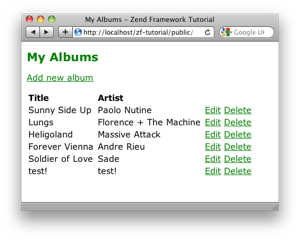
Tutorial-Screenshot.jpg
This tutorial is intended to give a very basic introduction to using the Zend Framework to write a simple database driven application.

NOTE: This tutorial has been tested on version 1.5.0 of the Zend Framework. It stands a very good chance of working with later versions. It will not work on any version prior to version 1.5.0.
Also, If you are getting 404 errors when going to any page other than the home page, please make sure that you have set AllowOverride to All in your Apache configuration.

English version: Dowload the PDF (v1.5.2).

Translations

French by Guillaume Rossolini: http://g-rossolini.developpez.com/tutoriels/php/zend-framework/debuter/
Czech by Petr Parimucha: http://weblog.pari.cz/293/zaciname-se-zend-framework-15

Code

The associated code is available:

Further reading

Once you have finished this tutorial, Pádraic Brady is in the process of writing a very comprehensive blog tutorial that is well worth going through. Or just buy the book!

Previous versions of this tutorial

The original tutorial for Zend Framework 1.0 is still available, along with the translations for it.

Changelog

1.5.2
Use a screenshot for the directory layout.
1.5.1
Fixed minor mistakes found by Jason Qi and Źmicier.
1.5.0
Significant revision to take advantage of Zend Framework 1.5
1.4.0
Updates to support version 1.0.0. RC1 of the Zend Framework.
1.3.0
Significant reworking to support version 0.9 of the Zend Framework.
1.2.0
Updated tutorial for version 0.6 of the Zend Framework.
1.1.0
Updated tutorial for version 0.2 of the Zend Framework.
1.0
Original version

103 Responses to “Tutorial: Getting Started with Zend Framework 1.5”

  1. 1 WIL

    Hallo Rob,
    I use your Tutorial: Getting Started with Zend Framework 1.5 on my local server works very good and if i load it on the server of my provider i get this error:
    ———–
    Internal Server Error
    The server encountered an internal error or misconfiguration and was unable to complete your request.
    Please contact the server administrator, support@one.com and inform them of the time the error occurred, and anything you might have done that may have caused the error.

    More information about this error may be available in the server error log.

    —————
    http://www.dynascript.nl/zf-tutorial/public/index.php

    Regards,
    Wil

  2. 2 Rob...

    Wil,

    I think you are going to have to see the logs to work out what's going on.

    Regards,

    Rob…

  3. 3 WIL

    I have sent mail to support.one.com and they say their server don't support zend framework. but their server support php5.2.5.

  4. 4 Raz

    Hello Rob…
    just yesterday began with the old tutorial and i was thinking that it's been some time since 2006 :P. Anyway I'm new to zf and you're giving me a big hand with your work. Thanks.
    p.s. i need to integrate ext JS with zend can you please give me a start point?
    pp.s. thanks again

  5. 5 Rob...

    Hi Raz,

    The old tutorial had been pretty well debugged by version 1.4.5, so didn't need much in the way of updating regularly.

    However Zend Framework 1.5 brings some very useful new features with Zend_Layout and Zend_Form that a new version was most certainly required in order to understand how useful ZF is.

    Regards,

    Rob..

  6. 6 Mark

    WIL,

    I had the same problem, its due to the .htaccess file. Here is the response that worked for me. The log file reads: "Invalid command 'RewriteEngine', perhaps mis-spelled or defined by a module not included in the server configuration."

    The solution:
    "It sounds like you don't have mod_rewrite loaded.

    If it's your server, open the httpd.conf file and look for these lines:

    #LoadModule rewrite_module modules/mod_rewrite.so
    #AddModule mod_rewrite.c

    If you see them, simply remove the # from the beginning and then save the file. If you don't see them, put them in there, without the #, of course.

    You will need to restart Apache for the change to take place."

    You should read what it says in the log files.

    "

  7. 7 Mark

    Also, this tutorial was great. Got me started on the right direction and understanding how the MVC system works. I love it how you don't need to name any files, you see no file extensions when using the site, it's mad.

  8. 8 WIL

    Hallo Rob, could you help me with this issue. If i go to this url http://www.dynascript.nl/public/index.php then everything works good but i want if the user go to this http://www.dynascript.nl then the site works too.
    Regards,
    Wil

  9. 9 WIL

    O sorry i mean if the user go to this http://www.dynascript.nl then i get http error 403.

  10. 10 Turist

    Thanks Rob, hope you'll upgrade the Zend_Auth tutorial ;)

  11. 11 Rob...

    Wil,

    You'll need to move index.php to the root.

    Regards,

    Rob…

  12. 12 Rob...

    Mark,

    Glad you found it useful :)

    Regards,

    Rob…

  13. 13 Rob...

    Turist,

    All in good time… I'm a bit snowed under at the moment though!

    Regards,

    Rob…

  14. 14 Отдых

    After install tutorial and open in browser i have err, what is it? help me pls, mysql in other php applications good work.

    Fatal error: Uncaught exception 'Zend_Db_Adapter_Exception' with message 'The mysql driver is not currently installed' in C:\www\rasprodagafront\library\Zend\Db\Adapter\Pdo\Abstract.php:104 Stack trace: #0 C:\www\rasprodagafront\library\Zend\Db\Adapter\Abstract.php(390): Zend_Db_Adapter_Pdo_Abstract->_connect() #1 C:\www\rasprodagafront\library\Zend\Db\Adapter\Pdo\Abstract.php(206): Zend_Db_Adapter_Abstract->query('DESCRIBE 'album…', Array) #2 C:\www\rasprodagafront\library\Zend\Db\Adapter\Pdo\Mysql.php(137): Zend_Db_Adapter_Pdo_Abstract->query('DESCRIBE 'album…') #3 C:\www\rasprodagafront\library\Zend\Db\Table\Abstract.php(605): Zend_Db_Adapter_Pdo_Mysql->describeTable('albums', NULL) #4 C:\www\rasprodagafront\library\Zend\Db\Table\Abstract.php(534): Zend_Db_Table_Abstract->_setupMetadata() #5 C:\www\rasprodagafront\library\Zend\Db\Table\Abstract.php(269): Zend_Db_Table_Abstract->_setup() #6 C:\www\rasprodagafront\application\controllers\IndexController.php(8): Zend_Db_Table_Abstract->__construct() #7 C:\www\rasproda in C:\www\rasprodagafront\library\Zend\Db\Adapter\Pdo\Abstract.php on line 104

  15. 15 Rob...

    ОтÐ'ых,

    Try installing the PDO and PDO_MYSQL PHP extensions.

    Regards,

    Rob…

  16. 16 Mister Olympia

    Rob thank you.

    May be you know, why if i click at any link in that script(tutorial), browser open that page "Object not found Error 404″.

  17. 17 Rob...

    Mister Olympia,

    Two choices:
    1. Your .htaccess isn't being read
    2. mod_rewrite needs enabling in httpd.conf

    Regards,

    Rob…

  18. 18 Wil Sinclair

    Wow! Someone else named Wil who spells it with one 'l'. So this is what it sounds like. . . when doves cry. (see 'Lemons of Troy' episode of the Simpons).

    ,Wil

  19. 19 WIL

    Hallo rob thanks for you reaction, I have a problem, your tutorial works very good.Now i want to load an other controllerclass (categoryController) with the indexcontroller thus both at the same time. I want to display categoryController (indexAction) as a menu on the top en the indexcontroller (indexAction) on the body of the website.
    How can i solve that
    Regards,
    Wil

  20. 20 Rob...

    Wil,

    You need to use the ActionStack. Have a look at my Simple Zend_Layout Example post for ideas.

    Regards,

    Rob…

  21. 21 Rob...

    Wil Sinclair,

    It's not that uncommon over this side of the pond. At least, I know a couple of guys who use the single l version :)

    Regards,

    Rob…

  22. 22 Rob...

    Wil,

    Hmm… not that entry!

    I was thinking of chapter 4 of Zend Framework in Action!

    Sorry,

    Rob…

  23. 23 WIL

    I have bought jesterday your book, I have received pdf and in September 2008 (est.) i wil receive print book, Ok i wil read right now chapter 4.
    Thanks

  24. 24 noury

    Hai Rob,
    Could you tell me
    How i can execute an action of classcontroller within an other controller.
    For examle i want to execute this function messagesAction($num) in other controller.
    Note: messageAction have a parameter.
    Thanks

  25. 25 Rob...

    noury,

    _forward().

    Regards,

    Rob…

  26. 26 noury

    I have an action with a parameter. how can i pass that parameter to my acion with _forward.for example: messagesAction($num);
    thanks

  27. 27 Rob...

    noury,

    $this->setParam(num, $num);

    Regards,

    Rob…

  28. 28 monika

    Hi, I'm a new to Zend and PHP, and trying to learn it from your tutorial. Currently I'm using XAMPP and downloaded your tutorial. I have configured the application/config file to access MySQL and created the table and entries with the exact same names. But when running the webapp I got the following error:

    Fatal error: Uncaught exception 'Zend_Db_Statement_Exception' with message 'SQLSTATE[42S02]: Base table or view not found: 1146 Table 'zftest.albums' doesn't exist'

    I see the albums coming from the model/Albums.php. Why it can not map it?

    I have no idea what else needs to be modified to make it run… Any suggestion would be really appreciated.
    Thank you.
    Monika

  29. 29 Rob...

    Monika,

    You haven't created the database table within MySQL.

    Regards,

    Rob…

  30. 30 Falcon

    Hi there, first of all, your tutorial is great. I have a little problem though: when I submit the changes, the _redirec('/') part does not work. I get this error message:

    Cannot send headers; headers already sent…

    Now what? :)

    Thanks

  31. 31 Rob...

    Falcon,

    Have you googled?

    Regards,

    Rob…

  32. 32 Falcon

    Rob, sure I did, didn't want to look totally noob :) Despite my efforts, I look. So, all I have found is that nothing should be prior to the header information that is redirecting, and this I have already known. What I don't know is how this all works if I use Zend. Am a bit confused, though I'm trying to figure it out.

    Respect
    Falcon

  33. 33 Dennis Fogg

    Please see "Naming Recommendation for Controllers, Actions, and URLs using zend_controller" at http://www.nabble.com/Re%3A-Naming-Recommendation-for-Controllers%2C-Actions%2C-and-URLs-using-zend_controller-p16366498.html
    where the zend developer says:

    Your controllers and actions can have camelCasing to accomodate multiple words

    This is a clarification on some of the advice that you have in your tutorial.

  34. 34 Rob...

    Dennis,

    Whilst you are correct that it is possible to use camel casing in action names, make sure you have read and understood the note on http://framework.zend.com/manual/en/zend.controller.basics.html:

    "Since humans are notoriously inconsistent at maintaining case sensitivity when typing links, Zend Framework actually normalizes path information to lowercase. This, of course, will affect how you name your controller and actions… or refer to them in links.
    If you wish to have your controller class or action method name have multiple CamelCasedWords, you will need to separate those words on the url with either a '-' or '.' (though you can configure the character used).
    As an example, if you were going to the action in FooBarController::bazBatAction(), you'd refer to it on the url as /foo-bar/baz-bat or /foo.bar/baz.bat."

    Also, camel cased action names were the biggest cause of upgrade problems from 1.0 to 1.5. So much so that it is mentioned in the migration notes here: http://framework.zend.com/manual/en/zend.controller.migration.html#zend.controller.migration.fromoneohtoonefive.

    The upshot is that camel casing action names is fine as long as you use hyphens in your URLs and view script filenames.

    Regards,

    Rob…

  35. 35 Dennis Fogg

    Rob,

    Thanks for the pointer to the docs on camelCase. Casing is discussing in multiple places and I missed that one.

    BTW, your link has an extra character at the end (:) so the link should be http://framework.zend.com/manual/en/zend.controller.basics.html

  36. 36 Rob...

    Thanks Dennis,

    Don't you just hate auto-linking at times?!

    Rob…

  37. 37 Kyia

    Hi,Rob

    The index page is work properly, but
    the url: http://http://localhost/zf_tutorial-150-with-zf/public/index/add shows:
    The requested URL /zf_tutorial-150-with-zf/public/index/add was not found on this server.

  38. 38 Nooooooooooob

    Pretty much the same problem as kyia it gives me the classic err that it cannot find the add controller though the controller is good and index works. Im a bit confused on what i should put in add.php and edit.php

  39. 39 Nooooooooooob

    Oh and by the way stuff never works when i was your version of .htaccess but if i use the default zend router from the doc i get index working help a brother out

  40. 40 Nooooooooooob

    Scratch that i got it working but i'd still like to know why .htaccess doesnt work

  41. 41 PhrosTT

    ATTENTION ALL:

    v.1.5.1 of this tutorial has a serious typo!

    The directory structure should have application, public, & library all within the same level. The should all be in zf-tutorial.

    public and library DO NOT GO INSIDE THE APPLICATION FOLDER!

    It should be:

    zf-tutorial
    -application
    –controllers
    –models
    –views
    -library
    -public
    –css
    –images
    –js

  42. 42 PhrosTT

    To restate for better visibility:

    The directory structure should be such that you have:

    zf-tutorial/application/controllers/IndexController.php
    zf-tutorial/application/models
    zf-tutorial/application/views
    zf-tutorial/application/views/scripts/index/add.phtml
    zf-tutorial/library/Zend
    zf-tutorial/public/css
    zf-tutorial/public/images
    zf-tutorial/public/js
    zf-tutorial/public/index.php
    zf-tutorial/public/.htaccess

  43. 43 Rob...

    I've been struggling with the indentation of the folders. I should probably do a screenshot!

    Rob…

  44. 44 eko

    dear sir,

    i'm is student from indonesia and i'm is beginner in php. i have project from my school, how to connect zf with 2 different db. for master data i'm using ms. sql server and save data to mysql.

    thx's for your help.
    eko

  45. 45 Jevylux

    Hi Rob, thanks for this upgraded tutorial.
    It's a great help for me as a ZF Newbie.
    I however have a problem with the inclusion of the css stylesheet file in my own application, which I chaged to use layout as of today.

    The Baseurl helper seems to return nothing.
    It looks as it is called, but the getBaseUrl returns nothing.
    Here is the code of BaseUrl.php
    getBaseUrl();
    }
    }
    ?>

    What went wrong ?

  46. 46 Neo May

    Rob, I open up my IE, I am getting:

    set('config', $config); // setup database $db = Zend_Db::factory($config->db); Zend_Db_Table::setDefaultAdapter($db); // setup controller $frontController = Zend_Controller_Front::getInstance(); $frontController->throwExceptions(true); $frontController->setControllerDirectory('../application/controllers'); Zend_Layout::startMvc(array('layoutPath'=>'../application/layouts')); // run! $frontController->dispatch();

    New to PHP, please help!

  47. 47 Alex

    Hi Rob.

    Thank you very much for this great tutorial. It was very helpful for me as a beginner in developing with the Zend Framework. Big THX. Keep it up!

  48. 48 Paris

    Hi Rob,

    First of all, thanks for all this great tutorials!

    I was wondering why you don't put the layout directory in /application/views? Maybe you have a good reason, hope I'm not been imprudent lol.

  49. 49 FatCore

    Wow, i'm impressed. This is the best introduction tutorial to a MVC framework i've ever seen. Most framework tutorials don't give fully information to get started like how to use layouts (or partials) to prevent duplicate coding. Thanks and keep up the good work, i'll buy your book.

  50. 50 Ina

    Thanks. Quick, easy to understand, just the best ZF newbie tutorial I've seen so far!

  51. 51 ptoom

    I've gotten cake, symphony, and ap3 skeleton to "just work". Can't get zend to "just work". Can't get your tutorial files to work (1.0,1.3, nor 1.41)…. I had a list of the problems I've been having … but I'll try 1.5.2 just to be sure….

    …do you think I'm mentally retarded? I mean, I've been trying to get zfw to work on my localhost since…gosh, since framework.zend.com went live! Haven't gotten it to work yet…haven't gotten your tutorial files to work either. Am I stupid. Somebody fill me in. wtf?

  52. 52 ptoom

    my setup and my problems

    http://localhost/zfw/ is where I put your files
    When I go to this address I get:
    Forbidden
    You don't have permission to access /zfw/public/ on this server.

    So I comment out the rewrite lines of the .htaccess file in zfw/public

    Now I get a fatal error and stack trace because I don't have PDO.
    (I don't have pdo because I try to match our live server which also doesn't have PDO and won't be upgraded for another year or 2)
    So I edit the config file and change the db adapter to MYSQLI.

    I recreate the zftest database, album table, user rob with password 123456.

    I'm pretty sure with version 1.41 of your tutorial my problem was with the Album model class or with the database connection itself. But I couldn't figure out how to troubleshoot the album object. I'd usually start by var_dump-ing or print_r-ing the object but somewhere in the creation of the "new Album" the app would die without generating any kind of error (display errors was on and error reporting was set to E_ALL)

    Now I get a different fatal error:
    Fatal error: Uncaught exception 'Zend_Db_Adapter_Mysqli_Exception' with message 'The Mysqli extension is required for this adapter but the extension is not loaded' in W:\www\zfw\library\Zend\Db\Adapter\Mysqli.php:280

    So I try changing the adapter to MYSQL:
    Fatal error: Uncaught exception 'Zend_Exception' with message 'File "Zend\Db\Adapter\Mysql.php" was loaded but class "Zend_Db_Adapter_Mysql" was not found in the file' in W:\www\zfw\library\Zend\Loader.php:88

    Took a look in Zend\Db\Adapter\ and there actually is not a file named Mysql.php

    So I don't have pdo or mysqli and zfw doesn't want to use mysql_ …and now I don't know where to go from here.

  53. 53 Rob...

    ptoom,

    You have to have either the mysqli or pdo extensions installed.

    Regards,

    Rob…

  54. 54 JhepunK

    Hey Buddy, this tutorial is great. Thank you, terima kasih, gracias, whatever lah it's the same point.

  55. 55 walter

    xHTML results…

    Your wonderful example does not create xHTML. I found this bit …

    $viewRenderer->view->doctype('XHTML1_STRICT');

    But i have no idea where to place in with the structure of your example code.

    Can you give guidance?

    Thx

  56. 56 walter

    on "$frontController->setBaseUrl ();"

    why can't I place a full URL [http://mydomain.com/path/] in this property?

    When I do, none of the links within this demo works. They look right when I view source, but they don't go anywhere.

    Walter

  57. 57 Rob...

    Walter,

    The BaseUrl is the bit after the server name. In this case, "/path"

    Regards,

    Rob…

  58. 58 walter

    Rob, yes, I gathered that; then how do I get the "server name" into the paths on the generated links?

  59. 59 Mattias

    Why do are my menu links set to visited while using this tutorial?

    above the content div i have:

    <a href="url(array('controller'=>'index','action'=>'index'));?>"> Hem

    <a href="url(array('controller'=>'index','action'=>'items'));?>"> Varor

    <a href="url(array('controller'=>'index','action'=>'info'));?>"> Info

  60. 60 Mattias

    that ctrl v was not so successfull :(

    <a href="url(array('controller'
    =>'index','action'=>'index'));?>"> Hem

    <a href="url(array('controller'
    =>'index','action'=>'items'));?>"> Varor

    <a href="url(array('controller'
    =>'index','action'=>'info'));?>"> Info

  61. 61 Mattias

    omg!

    ok i describe the setup with words-

    one headerwrapper div with an header div inside.

    the above mentioned links all have a menu div each.

  62. 62 guenti

    Hi Rob,

    I will translating your tutorial to german and publishing in my blog. Is it okay?

  63. 63 Rob...

    guenti,

    Sure!

    Regards,

    Rob…

  64. 64 guenti

    Rob,

    fine! This tutorial is one of the best that I've found in the www, and it's up to date. If I have published the german version, I will communicate it to you.

  65. 65 Felix Jacobi

    If you're having problems with the Zend_View_Helper_BaseUrl Class because it returns nothing and you're running this Tutorial in a VHost or Rootdirectory of your Apache try it that way:

    setBaseUrl('.');
    return $zcf->getBaseUrl();
    }
    }
    ?>

  66. 66 TedInAK

    Excellent tutorial! I'm new to ZF and been playing around with it for the last week or so. Found a bug in your BaseUrl.php, though. If you include "index.php" in your browser's address bar, e.g., http://example.com/zf_tutorial/index.php, then baseUrl() returns "/zf_tutorial/index.php" which breaks the usage of it, notably in:

    <link rel="stylesheet" type="text/css" media="screen" href="baseUrl();?>/css/site.css" />

    which returns

    Here's my fix:

    function baseUrl()
    {
    $baseUrl = Zend_Controller_Front::getInstance()->getBaseUrl();
    return str_replace('/index.php', ", $baseUrl);
    }

  67. 67 TedInAK

    Whoops…that got broken. Lemme try again:

    Excellent tutorial! I'm new to ZF and been playing around with it for the last week or so. Found a bug in your BaseUrl.php, though. If you include "index.php" in your browser's address bar, e.g., http://example.com/zf_tutorial/index.php, then baseUrl() returns "/zf_tutorial/index.php" which breaks the usage of it, notably in:

    <link rel="stylesheet" type="text/css" media="screen" href="baseUrl();?>/css/site.css" />

    which returns

    Here's my fix:

    function baseUrl()
    {
    $baseUrl = Zend_Controller_Front::getInstance()->getBaseUrl();
    return str_replace('/index.php', ", $baseUrl);
    }

  68. 68 mdrisser

    I'm having the same problem as Kyia, localhost/zf-tutorial/ works just fine, but localhost/zf-tutorial/index/add doesn't, all I get is a 404 not found error.

    I've checked and rechecked the .htaccess file, checked the httpd.conf (mod_rewrite is installed), there's nothing in the logs that indicates why it's not working. Any suggestions?

  69. 69 Rob...

    mdrisser,

    AllowOverride is not set to All

    Regards,

    Rob…

  70. 70 Trinath

    Hi ,

    I have followed the ZF tutorial and implemented it ..

    Iam able to see the index page but unable to see other pages ..

    Like I able to see http://localhost/gen gives me the index page

    but http://localhost/gen/index/add is showing me 404 error page not found .. though I have the .phtml file and addAction() in IndexController.php file

    please help me in this regard ..

    -
    Trinath

  71. 71 Garra

    Thanks
    But how can i install pdo extensions

  72. 72 alitrix

    @Trinath, did you check your apache config?

    Search for something like this:

    Options FollowSymLinks
    AllowOverride None

    Make it:
    AllowOverride All

  73. 73 SuperVlao

    Pretty nice :)

  74. 74 jegan

    very good tutorial for the zend framework beginners like me… i searched many ,but find this is best

  75. 75 Fadel

    Pretty nice, thank you

  76. 76 Onur Özgür ÖZKAN

    Dear Rob,

    This is the best article which i have been seen over ZF beginners. I translate it in Turkish. You can find http://www.onurozgurozkan.org/2008/05/17/zend-frameworke-giris/

    Best Regards.

  77. 77 jharder

    Hi Rob,

    I've tried to get your tutorial to work on my local machine, but I'm hitting the same 404 errors that others have reported. Your complete sample works just fine, and I've combed through my httpd.conf file and set every AllowOverride I can find to All.

    What am I missing?

  78. 78 firecall

    Great PDF tut. Thanks :)

    Typo: page 7:
    "That is, the view script rendered is
    views/scripts/{controller name}/{action_name}.phtml and the rendered
    contents are append it to the Response object’s body."

    should read "… appended to…" I guess :)

  79. 79 firecall

    Bottom of page 8:

    "Testing each controller/action by navigating the urls shown earlier should display the four
    titles within the web browser. "

    It wasnt totaly clear that the urls need to be something like:
    localhost/index/add

    etc…

    I tried localhost/add which didnt work :)

  80. 80 dogggg

    Having problems getting bootstrapper to work. My error in apache is

    .htaccess: Invalid command 'php_flag', perhaps misspelled or defined by a module not included in the server configuration

    I'm not sure what to do with mod_php.

  81. 81 dogggg

    Nevermind, I found a solution

    https://www.hostingclientsupport.com/index.php?_m=knowledgebase&_a=viewarticle&kbarticleid=34

  82. 82 firecall

    Typo, top of page 10:

    "…we require form
    the request object."

    should be 'from'.

  83. 83 firecall

    Hint for anyone that gets the "Cannot send headers.." error message.

    Remove any white space before the <?php tags!

    I didnt know about that and got the error :)

  84. 84 greggo

    Hi, Im on a Mac, using Leopard and I get the error "Fatal error: Uncaught exception 'Zend_Db_Adapter_Exception' with message 'The mysql driver is not currently installed' in /Library/WebServer/Documents/zend/library/Zend/Db/Adapter/Pdo/Abstract.php:104 Stack trace: #0 /Library/WebServer/Documents/zend/library/Zend/Db/Adapter/Abstract.php(390): Zend_Db_Adapter_Pdo_Abstract->_connect() #1 /Library/WebServer/Documents/zend/library/Zend/Db/Adapter/Pdo/Abstract.php(206): Zend_Db_Adapter_Abstract->query('DESCRIBE 'album…', Array) #2 /Library/WebServer/Documents/zend/library/Zend/Db/Adapter/Pdo/Mysql.php(137): Zend_Db_Adapter_Pdo_Abstract->query('DESCRIBE 'album…') #3 /Library/WebServer/Documents/zend/library/Zend/Db/Table/Abstract.php(605): Zend_Db_Adapter_Pdo_Mysql->describeTable('albums', NULL) #4 /Library/WebServer/Documents/zend/library/Zend/Db/Table/Abstract.php(534): Zend_Db_Table_Abstract->_setupMetadata() #5 /Library/WebServer/Documents/zend/library/Zend/Db/Table/Abstract.php(269): Zend_Db_Table_Abstract->_setup() #6 /Library/WebServer/Documents/zend/application/cont in /Library/WebServer/Documents/zend/library/Zend/Db/Adapter/Pdo/Abstract.php on line 104″.
    I installed the pdo.so and pdo_mysql.so files, but the stock Mac Leopard PHP won't load them. When I run "php -m | grep -i pdo" I get "PHP Warning: PHP Startup: Unable to load dynamic library './pdo.so' - (null) in Unknown on line 0
    PHP Warning: PHP Startup: Unable to load dynamic library './pdo_mysql.so' - (null) in Unknown on line 0
    PDO
    pdo_sqlite". Ive read that PHP in Leopard had dynamic extention loading disabled, but not sure how reliable that is.
    Is there a workaround?

  85. 85 greg

    Ok, for all you Mac Leopard users like me who have had this issue, the workaround is to not even bother with the pdo_mysql. Leopard's PHP5 comes with MYSQLI already set up, so to get your db connection you have to change the config.ini in this tutorial. You DO NOT need a different install of PHP. Go to application/config.ini and change db.adapter = PDO_MYSQL to be db.adapter = MYSQLI. Works like a charm then.

  86. 86 Rob...

    Hi greg,

    That works great until you need GD :)

    Rob…

  87. 87 K

    Thats a great tutorial, I've been avoiding using Zend since theres a lack of simple getting started material, but this has convinced me to give it a try.

  88. 88 Snowcore

    Really nice post! Thanks!

  89. 89 Kevin

    Thanks for the great tut! One thing tho…

    Who uses 'id' for their primary key? Typically it would be 'user_id' or 'product_id'. You mention that the default for Zend_Db_Abstract is to look for 'id' but I think it would be much more helpful if your tutorial actually used a primary key other than the default. I've been all over looking for how to do this and I can't seem to get around it. I've added:
    protected $_primary = 'album_id';
    to the Albums.php class/model but it's as though it is simply ignored. Any help would be greatly appreciated!!! Thanks again, this tutorial got me up and going with ZF.

  90. 90 Lubos Lavicka

    GREAT, GREAT, GREAT!!! Thanks very much! Simple, straightforward.

  91. 91 Martijn

    for some reason the only way i can get the models to work is to manually include them like this.

    include('../application/models/Albums.php');
    include('../application/models/AlbumForm.php');

    Any reason for this not working?

    Any help is appreciated

  92. 92 Rob...

    Hi Martijn,

    At a guess, your models directory isn't on your php_include path.

    Regards,

    Rob…

  93. 93 Martijn

    Anyway to fix this? Or check..

  94. 94 Dan

    Rob, thanks for the tutorial - it has really helped.

    The problem I'm having is that with the code:

    $row = $courses->fetchRow('ID='.$id);
    $row->TITLE = $form->getValue('TITLE');
    $row->save();

    I get a "Call to undefined method stdClass::save()" fatal error, but http://framework.zend.com/manual/en/zend.db.table.row.html says the fetchRow() method returns an object of type Zend_Db_Table_row, so this code should be fine, right?

    Any advice on this appreciated.

  95. 95 Elias

    Hi,

    for me it's not clear when I must use the Zend_Form and when I can create the form in the view script. For instance,why did you use zend_Form for the pages "add" and "edit", but didn't for "delete" page?

    thanks!

  96. 96 Rob...

    Elias,

    It's up to you :) I show both ways in the tutorial.

    Rob…

  97. 97 koushika

    Dear rob,
    i am student and i am learning php, for which i downloaded this application. tried to deploy finally when i tried running using :

    http://localhost/zf_tutorial/public/

    i got the following error please help me. i am doing my academic project too in jsp with zend frame work. i wish your guidance. thank you

    Fatal error: Uncaught exception 'Zend_Db_Adapter_Exception' with message 'SQLSTATE[28000] [1045] Access denied for user 'koushika'@'localhost' (using password: YES)' in C:\wamp\www\zf_tutorial\library\Zend\Db\Adapter\Pdo\Abstract.php:131 Stack trace: #0 C:\wamp\www\zf_tutorial\library\Zend\Db\Adapter\Abstract.php(390): Zend_Db_Adapter_Pdo_Abstract->_connect() #1 C:\wamp\www\zf_tutorial\library\Zend\Db\Adapter\Pdo\Abstract.php(206): Zend_Db_Adapter_Abstract->query('DESCRIBE 'album…', Array) #2 C:\wamp\www\zf_tutorial\library\Zend\Db\Adapter\Pdo\Mysql.php(137): Zend_Db_Adapter_Pdo_Abstract->query('DESCRIBE 'album…') #3 C:\wamp\www\zf_tutorial\library\Zend\Db\Table\Abstract.php(605): Zend_Db_Adapter_Pdo_Mysql->describeTable('albums', NULL) #4 C:\wamp\www\zf_tutorial\library\Zend\Db\Table\Abstract.php(534): Zend_Db_Table_Abstract->_setupMetadata() #5 C:\wamp\www\zf_tutorial\library\Zend\Db\Table\Abstract.php(269): Zend_Db_Table_Abstract->_setup() #6 C:\wamp\www\zf_tutorial\application\controllers\IndexController.php(8): Z in C:\wamp\www\zf_tutorial\library\Zend\Db\Adapter\Pdo\Abstract.php on line 131

  98. 98 Rob...

    koushika,

    The error message tells you what is wrong:

    "Access denied for user 'koushika'@'localhost'"

    Regards,

    Rob…

  99. 99 Nicky

    Great tutorial

  100. 100 Calista

    Dear Rob,

    since there is no german translation I've done it know at my own risk. Is it okay if I put it on my website with reference to you?

    Could be done till this weekend :-)

    bye, calista

  101. 101 Rob...

    Calista,

    Of course!

    Regards,

    Rob…

  102. 102 priya

    1. Please let me know , why you use views files as .phtml instead of .php

    2. i could see that the models also include eg: albumform you set the label, test field in the model file when you could put all these things in view file .

  103. 103 ShaileshPatel

    Hi,
    Can any body help??
    I'm new in ZF. And I need to implement an ajax base search feature in it using ZF. But It gives me error about missing path and/or forbidden error. I thnk that my problem is in either bootstrap or in controller.

The views expressed in these comments are not the views of the publisher. However, we believe in the rights of others to express their legitimate views and concerns. Any legitimate complaint emailed to rob@akrabat.com will be seriously considered and the post reviewed as desirable and necessary.

Leave a Reply

Pre order